


Build and Train a 152-Layer Model

Build and Train a 152-Layer Model with Residual Connections
Learn how ResNet-152 broke the 22-layer limit.
Introduction
In weekly articles for the last 6 weeks, we have looked at many aspects of linear algebra and tried to connect it to machine learning. The underlying goal is to motivate ourselves to become experts in the math, so that we can be world class at machine learning.
For this reason, we have looked at the conceptual basis of eigenvalues and eigenvectors. Then we learned how to calculate them, and then we learned how they can be used to analyze real network layers using their cousins, singular vectors and singular values.
We have also looked in detail at recurrent neural networks — mostly to understand the value of matrix transformations. But also to understand the rudiments of network architecture.
All of this work comes together here.
This time we will look at another piece of network architecture: The residual connection.
The residual connection is a simple concept. It’s so simple that we might step back and say: ‘Is that all?’ And then: ‘If that’s all it is, then how can it be so effective?’
But let’s jump to some startling facts: Before residual connections, a network with 20–22 layers — VGG-19 — was considered deep. This was up until about 2015. In 2015 ResNet-152 used 152 layers. It entered and won ImageNet. And after that, networks with 1000+ layers became possible.
Modern transformer based networks don’t have so many layers. Instead, transformer layers are much more complex than a ResNet layer. But ResNet was part of that growth.
At about 2012, AlexNet had 8 layers and performed simple convolutions. At about 2014, VGG had 16–19 layers. This was still relatively simple by today’s standards. But the limit seemed to be about 20–22 layers before vanishing gradients killed training. At the same time (2014), GoogLeNet/Inception achieved the first major complexity increase, using parallel paths and concatenating results. But the problem was still that networks couldn’t go more than about 22 layers deep.
In 2015, ResNet changed that. Its innovation was to skip connections. We will shortly get to what that means. But the net result was that the 22 layer barrier was broken. Networks could train 152+ layers. And they solved the vanishing gradient problem. This made network depth a new frontier.
Later, with ResNeXt, DenseNet and Squeeze-and-Excitation nets in 2016 and 2017, the basic ResNet style had both depth and complexity. But that story is for another time.
Here we are concerned with how ResNet worked, how it stopped vanishing gradients, and how that is related to eigenvectors and eigenvalues. And in the end we will build and use our own ResNet network.
How Do ResNet’s Skip Connections Work?
In a standard network with no residual connections, each layer sees only the transformed output of the previous layer:

In a ResNet-type of network, each layer sees the transformed output of the previous layer, but it ALSO gets the output from two layers back:

In the illustration, Layer1 is formed as usual from the input x0. This produces the output of Layer1, which we call x1.
Layer2 is formed from the input x1. But the output x2 is the sum of Layer2 and x0.
Layer3 is formed from the input x2, but the output x3 is the sum of Layer3 and x1.
The following illustration says the same thing. It shows how input contributes both the next layer and also to the layer after that.
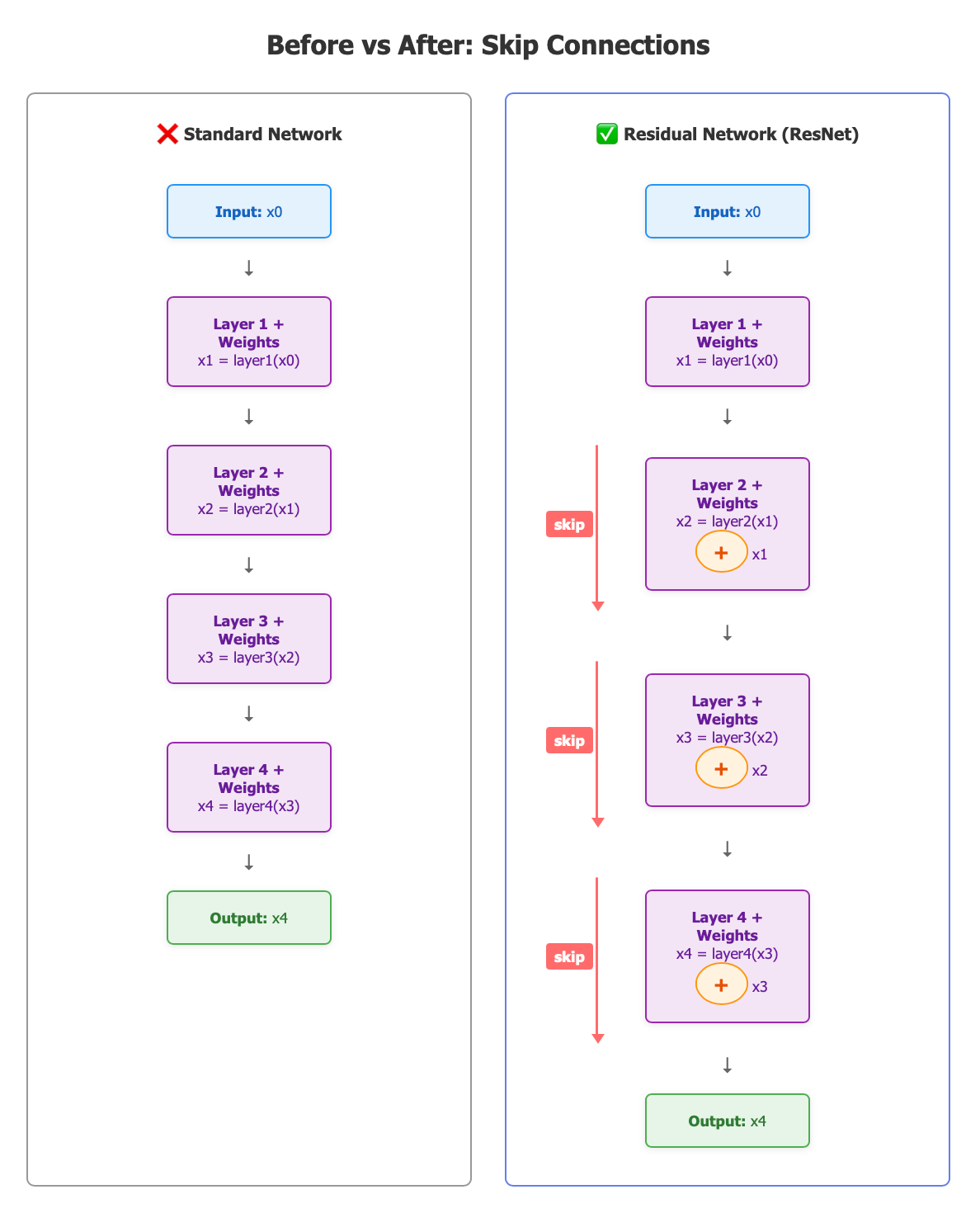
Key Difference: The red skip connections on the right allow the input to each layer to be added back to the output. This simple “+ x” is what enables training networks with 152+ layers!
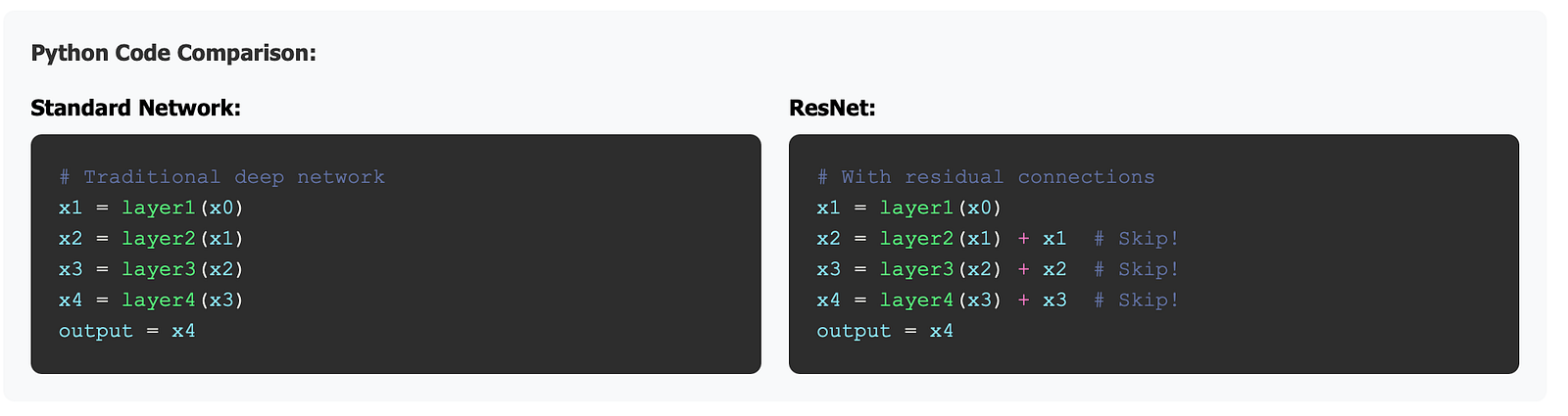
If we were to put this in python pseudo code, it might look like this:
Why This was Revolutionary for Gradients
The gradient flow problem without residuals is the problem of exploding or vanishing gradients that we discussed in another recent article. Here is the situation without residuals during backpropagation:
# Forward pass

x1 = W1 @ x0
x2 = W2 @ x1
x3 = W3 @ x2

output = W4 @ x3

<span class="hljs-comment"># Backward pass - chain rule</span>
∂L / ∂x0 = ∂L / ∂output × ∂output / ∂x3 × ∂x3 / ∂x2 × ∂x2 / ∂x1 × ∂x1 / ∂x0

∂L / ∂x0 = ∂output × W4ᵀ × W3ᵀ × W2ᵀ × W1ᵀ

<span class="hljs-comment"># Problem: Multiplying many matrices!</span>
<span class="hljs-comment"># If eigenvalues > 1: explosion</span>
<span class="hljs-comment"># If eigenvalues < 1: vanishing</span>
What’s Happening
In the forward pass, the data flows through the network by multiplying with weight matrices at each layer: x0 → W1 → x1 → W2 → x2 → W3 → x3 → W4 → output. Each layer transforms the data using its learned weights. This is normal input and is not the problem.
In the backward pass, during backpropagation, we need to compute how the loss depends on each weight matrix (∂L/∂W₁, ∂L/∂W₂, etc.) so we can adjust them to reduce the loss. This requires propagating the loss derivative backward by multiplying through ALL the weight matrix transposes: ∂L/∂output × W4ᵀ × W3ᵀ × W2ᵀ × W1ᵀ.
This leads to the multiplication problem.
When you multiply many matrices together, the result is dominated by their eigenvalues. If the weight matrices have eigenvalues larger than 1, the loss signal grows exponentially with each multiplication. This leads to something called exploding gradients. The numbers become huge, causing not-a-number (NaN) errors. If the eigenvalues are smaller than 1, the loss signal shrinks exponentially with each multiplication. This leads to vanishing gradients, where numbers become tiny, approaching zero.
Why This Kills Deep Networks
In a 20-layer network without skip connections, you’d be multiplying 20 weight matrices together! Even if each matrix shrinks the loss signal by just 0.5, you get 0.5²⁰ ≈ 10^-6 (essentially zero). The early layers receive almost no loss information, so they can’t learn anything.
On the other hand, if each weight matrix scales the gradient by 1.5, then the early layers will explode with very high values, and again, they can’t learn anything because their magnitudes are too high.
The problem only gets worse as we add more layers.
The Skip Connection Solution
ResNet’s skip connections provide an alternative gradient path that doesn’t require multiplying through all those weight matrices. The gradient can flow directly backward through the “+” additions, bypassing the problematic matrix multiplications. This is why the simple “+ x” enables training 152-layer networks!
The Math Magic
The mathematical reason behind this is a little bit cool. The forward pass adds a term, as follows:

And the derivative of that formula is used in the back propagation. Since the derivative of ‘x’ is 1, it looks like this:

But the “+1” means that the gradient won’t vanish!
Concrete Example
Let’s trace gradients through 50 layers.
Without residuals, the gradient gets smaller and smaller as we apply it to subsequent layers:
# Gradient shrinks by factor of 0.9 each layer
gradient_layer_50 = <span class="hljs-number">1.0</span>
gradient_layer_40 = <span class="hljs-number">1.0</span> × <span class="hljs-number">0.9</span>^<span class="hljs-number">10</span> = <span class="hljs-number">0.35</span>
gradient_layer_30 = <span class="hljs-number">1.0</span> × <span class="hljs-number">0.9</span>^<span class="hljs-number">20</span> = <span class="hljs-number">0.12</span>
gradient_layer_20 = <span class="hljs-number">1.0</span> × <span class="hljs-number">0.9</span>^<span class="hljs-number">30</span> = <span class="hljs-number">0.04</span>
gradient_layer_10 = <span class="hljs-number">1.0</span> × <span class="hljs-number">0.9</span>^<span class="hljs-number">40</span> = <span class="hljs-number">0.015</span>
gradient_layer_1  = <span class="hljs-number">1.0</span> × <span class="hljs-number">0.9</span>^<span class="hljs-number">50</span> = <span class="hljs-number">0.005</span>  ◄── Vanished!
With residuals, the gradient does not vanish:
# Each layer: ∂H/∂x = ∂F/∂x + 1
<span class="hljs-comment"># Even if ∂F/∂x = 0.1 (small), we get 0.1 + 1 = 1.1</span>

gradient_layer_50 = <span class="hljs-number">1.0</span>
gradient_layer_40 = <span class="hljs-number">1.0</span> × <span class="hljs-number">1.1</span>^<span class="hljs-number">10</span> = <span class="hljs-number">2.59</span>   ◄── Growing!
gradient_layer_30 = <span class="hljs-number">1.0</span> × <span class="hljs-number">1.1</span>^<span class="hljs-number">20</span> = <span class="hljs-number">6.73</span>
gradient_layer_20 = <span class="hljs-number">1.0</span> × <span class="hljs-number">1.1</span>^<span class="hljs-number">30</span> = <span class="hljs-number">17.4</span>
gradient_layer_10 = <span class="hljs-number">1.0</span> × <span class="hljs-number">1.1</span>^<span class="hljs-number">40</span> = <span class="hljs-number">45.3</span>
gradient_layer_1  = <span class="hljs-number">1.0</span> × <span class="hljs-number">1.1</span>^<span class="hljs-number">50</span> = <span class="hljs-number">117</span>    ◄── Still flowing!
It looks like the gradient may be exploding, but the ∂F/∂x terms are often small, so this works.
Create Your Own ResNet-152 Classifier
Actually, we are going to tune an existing classifier. But this will save a little time. It will still take about 10 minutes on an M1 to train about 10% of 1 epoch of training. So… 100 minutes times 10 epochs is still about 16 hours of training. But that’s less than a day for a real neural network that has 152 layers! Pretty cool on your home computer.
Setup
We’ll need to set up the following.
1. We’ll need the cat and dog images dataset from Kaggle. As of Feb 2026 the exact link to this dataset is here. If that link is broken, then do a search for ‘cat and dog images dataset’ and ‘Kaggle.’ It’s a pretty widely known dataset, so we can be confident that it’s out there. At this time, the large folder in that dataset contains 19.8k files.
a. Note the name: ‘Cat_And_Dog’ because the script below contains a reference to that exact name.
b. Note the path to that directory. The code below contains a path to that directory. In the code you’ll find the path as “/Users/username/Documents/data/Cat_And_Dog”. You’ll need to change the code to match the path to your Cat_And_Dog directory.
c. Note the folders within the Cat_And_Dog directory. Most of the images are in a folder named ‘train’ and if not, then you must either change the name of the folder or change the code.
2. After you have the data downloaded, you can load the file below. At the github gist link it is called ‘ResNet-152.py’. Note that the same link contains a longer markdown file with instructions. I prefer to load it in VS Code on a Mac or PC. Then open a new terminal window and run it: ‘python3 ResNet-152.py’
3. Be prepared to wait. If you train on almost 20,000 images it takes a long time on a standard PC. The code is set to train for 10 epochs, meaning it will go through the entire dataset 10 times. In our first attempt, it took about 2 hours per epoch.
import os
import shutil
import time
from pathlib import Path
import torch
import torch.nn as nn
from torch.utils.data import DataLoader
from torchvision import datasets, models, transforms
from tqdm import tqdm
import random

DEVICE = torch.device("cuda" if torch.cuda.is_available() else "cpu")

def prepare_local_cats_dogs_from_flat_train(
    data_dir,
    flat_train_subdir="Cat_And_Dog/train",  # adjust this if your folder name is different
    train_ratio=0.8,
):
    """
    Convert a flat train folder with files like 'cat.0.jpg', 'dog.1.jpg', ...
    into the structure expected by get_dataloaders:

      data_dir/
        train/
          cat/
          dog/
        val/
          cat/
          dog/

    Args:
        data_dir: root data directory (e.g. /Users/.../data/Cat_And_Dog)
        flat_train_subdir: relative path from data_dir to the flat train folder
        train_ratio: fraction of images per class to use for training
    """
    data_dir = Path(data_dir)
    flat_train_dir = data_dir / flat_train_subdir
    train_dir = data_dir / "train"
    val_dir = data_dir / "val"

    # If already prepared, skip
    if train_dir.exists() and val_dir.exists():
        print(f"[Local] Using existing train/val at {data_dir}")
        return

    if not flat_train_dir.exists():
        raise FileNotFoundError(f"Flat train folder not found: {flat_train_dir}")

    # Collect cat and dog files by prefix
    cat_files = sorted(
        [p for p in flat_train_dir.iterdir() if p.is_file() and p.name.lower().startswith("cat")]
    )
    dog_files = sorted(
        [p for p in flat_train_dir.iterdir() if p.is_file() and p.name.lower().startswith("dog")]
    )

    print(f"[Local] Found {len(cat_files)} cat files, {len(dog_files)} dog files in {flat_train_dir}")

    random.seed(42)
    random.shuffle(cat_files)
    random.shuffle(dog_files)

    def split_files(files):
        n_train = int(len(files) * train_ratio)
        train_files = files[:n_train]
        val_files = files[n_train:]
        return train_files, val_files

    cat_train, cat_val = split_files(cat_files)
    dog_train, dog_val = split_files(dog_files)

    # Create target dirs
    (train_dir / "cat").mkdir(parents=True, exist_ok=True)
    (train_dir / "dog").mkdir(parents=True, exist_ok=True)
    (val_dir / "cat").mkdir(parents=True, exist_ok=True)
    (val_dir / "dog").mkdir(parents=True, exist_ok=True)

    print("[Local] Copying files into train/val structure...")
    for src in cat_train:
        shutil.copy2(src, train_dir / "cat" / src.name)
    for src in cat_val:
        shutil.copy2(src, val_dir / "cat" / src.name)
    for src in dog_train:
        shutil.copy2(src, train_dir / "dog" / src.name)
    for src in dog_val:
        shutil.copy2(src, val_dir / "dog" / src.name)

    print("[Local] Done.")
    print(f"  Train: {len(cat_train)} cats, {len(dog_train)} dogs")
    print(f"  Val  : {len(cat_val)} cats, {len(dog_val)} dogs")

def get_dataloaders(data_dir, batch_size=16, num_workers=4):
    """
    Expects directory structure:
      data_dir/
        train/
          cat/
          dog/
        val/
          cat/
          dog/
    """

    train_dir = Path(data_dir) / "train"
    val_dir = Path(data_dir) / "val"

    # Standard ImageNet-like transforms
    train_transforms = transforms.Compose([
        transforms.Resize((256, 256)),
        transforms.RandomResizedCrop(224),
        transforms.RandomHorizontalFlip(),
        transforms.ToTensor(),
        transforms.Normalize(
            mean=[0.485, 0.456, 0.406],  # ImageNet means
            std=[0.229, 0.224, 0.225],   # ImageNet stds
        ),
    ])

    val_transforms = transforms.Compose([
        transforms.Resize((256, 256)),
        transforms.CenterCrop(224),
        transforms.ToTensor(),
        transforms.Normalize(
            mean=[0.485, 0.456, 0.406],
            std=[0.229, 0.224, 0.225],
        ),
    ])

    train_dataset = datasets.ImageFolder(train_dir, transform=train_transforms)
    val_dataset = datasets.ImageFolder(val_dir, transform=val_transforms)

    train_loader = DataLoader(
        train_dataset, batch_size=batch_size, shuffle=True,
        num_workers=num_workers, pin_memory=True
    )
    val_loader = DataLoader(
        val_dataset, batch_size=batch_size, shuffle=False,
        num_workers=num_workers, pin_memory=True
    )

    return train_loader, val_loader, train_dataset.classes

def build_resnet152(num_classes=2, pretrained=True):
    # Load ResNet-152 from torchvision
    model = models.resnet152(weights=models.ResNet152_Weights.DEFAULT if pretrained else None)

    # Replace the final fully-connected layer for 2 classes (cat vs dog)
    in_features = model.fc.in_features
    model.fc = nn.Linear(in_features, num_classes)

    return model

def train_one_epoch(model, loader, criterion, optimizer, epoch, device):
    model.train()
    running_loss = 0.0
    running_corrects = 0
    total = 0

    pbar = tqdm(loader, desc=f"Epoch {epoch} [train]", leave=False)
    for inputs, labels in pbar:
        inputs = inputs.to(device, non_blocking=True)
        labels = labels.to(device, non_blocking=True)

        optimizer.zero_grad()

        outputs = model(inputs)
        loss = criterion(outputs, labels)

        _, preds = torch.max(outputs, 1)

        loss.backward()
        optimizer.step()

        batch_size = inputs.size(0)
        running_loss += loss.item() * batch_size
        running_corrects += torch.sum(preds == labels).item()
        total += batch_size

        pbar.set_postfix({
            "loss": f"{running_loss / total:.4f}",
            "acc": f"{running_corrects / total:.4f}",
        })

    epoch_loss = running_loss / total
    epoch_acc = running_corrects / total
    return epoch_loss, epoch_acc

def eval_one_epoch(model, loader, criterion, epoch, device):
    model.eval()
    running_loss = 0.0
    running_corrects = 0
    total = 0

    with torch.inference_mode():
        pbar = tqdm(loader, desc=f"Epoch {epoch} [val]", leave=False)
        for inputs, labels in pbar:
            inputs = inputs.to(device, non_blocking=True)
            labels = labels.to(device, non_blocking=True)

            outputs = model(inputs)
            loss = criterion(outputs, labels)

            _, preds = torch.max(outputs, 1)

            batch_size = inputs.size(0)
            running_loss += loss.item() * batch_size
            running_corrects += torch.sum(preds == labels).item()
            total += batch_size

            pbar.set_postfix({
                "loss": f"{running_loss / total:.4f}",
                "acc": f"{running_corrects / total:.4f}",
            })

    epoch_loss = running_loss / total
    epoch_acc = running_corrects / total
    return epoch_loss, epoch_acc

def main():
    # ----- CONFIG -----
    # Root data directory that contains Cat_And_Dog/train
    data_dir = "/Users/username/Documents/data/Cat_And_Dog"
    batch_size = 16
    num_epochs = 10
    lr = 1e-4
    weight_decay = 1e-4
    # ------------------

    print(f"Using device: {DEVICE}")

    # 1) Prepare local data from flat train folder (no Kaggle API)
    prepare_local_cats_dogs_from_flat_train(
        data_dir=data_dir,
        flat_train_subdir="train",  # change if your flat train path is different
        train_ratio=0.8,
    )

    # 2) Build dataloaders
    train_loader, val_loader, classes = get_dataloaders(
        data_dir=data_dir,
        batch_size=batch_size,
        num_workers=4,
    )
    print(f"Classes: {classes}")  # should be ['cat', 'dog'] or similar

    # Model
    model = build_resnet152(num_classes=len(classes), pretrained=True)
    model = model.to(DEVICE)

    # Loss and optimizer
    criterion = nn.CrossEntropyLoss()
    optimizer = torch.optim.AdamW(model.parameters(), lr=lr, weight_decay=weight_decay)

    best_val_acc = 0.0
    save_path = Path("resnet152_cats_dogs_best.pt")

    for epoch in range(1, num_epochs + 1):
        t0 = time.time()

        train_loss, train_acc = train_one_epoch(
            model, train_loader, criterion, optimizer, epoch, DEVICE
        )
        val_loss, val_acc = eval_one_epoch(
            model, val_loader, criterion, epoch, DEVICE
        )

        dt = time.time() - t0
        print(
            f"Epoch {epoch:02d}/{num_epochs} "
            f"- {dt:.1f}s  "
            f"train_loss: {train_loss:.4f}, train_acc: {train_acc:.4f}  "
            f"val_loss: {val_loss:.4f}, val_acc: {val_acc:.4f}"
        )

        # Save best model
        if val_acc > best_val_acc:
            best_val_acc = val_acc
            torch.save({
                "model_state_dict": model.state_dict(),
                "classes": classes,
            }, save_path)
            print(f"  → New best model saved to {save_path} (val_acc={val_acc:.4f})")

    print(f"Training complete. Best val_acc = {best_val_acc:.4f}")
    print(f"Best model weights saved to: {save_path}")

if __name__ == "__main__":
    main()
Once the training is done, you have a model! Your terminal output will look something like this:
Epoch 8 [val]:  91%|███████████████████▏ | 226/248 [16:03<01:33,  4.26s/it, loss=0.0225, acc=0.9917]/Users/username/Library/Python/3.9/lib/python/site-packages/PIL/TiffImagePlugin.py:868: UserWarning: Truncated File Read
  warnings.warn(str(msg))
Epoch 08/10 - 8059.8s  train_loss: 0.0659, train_acc: 0.9737  val_loss: 0.0233, val_acc: 0.9912
Epoch 9 [val]:  91%|███████████████████▏ | 226/248 [16:18<01:33,  4.27s/it, loss=0.0373, acc=0.9900]/Users/username/Library/Python/3.9/lib/python/site-packages/PIL/TiffImagePlugin.py:868: UserWarning: Truncated File Read
  warnings.warn(str(msg))
Epoch 09/10 - 8092.5s  train_loss: 0.0636, train_acc: 0.9743  val_loss: 0.0346, val_acc: 0.9906
Epoch 10 [val]:  91%|██████████████████▏ | 226/248 [17:18<01:38,  4.49s/it, loss=0.0288, acc=0.9917]/Users/username/Library/Python/3.9/lib/python/site-packages/PIL/TiffImagePlugin.py:868: UserWarning: Truncated File Read
  warnings.warn(str(msg))
Epoch 10/10 - 8458.0s  train_loss: 0.0628, train_acc: 0.9757  val_loss: 0.0269, val_acc: 0.9922
Training complete. Best val_acc = 0.9927
Best model weights saved to: resnet152_cats_dogs_best.pt
The output is telling us that we have a very high training accuracy of 0.9757 after the 10th epoch. And the train_loss started at 0.1137 and dropped to 0.0636 by the end. The output also said it has created a new file with our trained weights: ‘resnet152_cats_dogs_best.pt’ is at the same path. And this is a large file — it might be about 200MB.
How to use it
Now for the best part. Grab the inference script gist from github or copy and paste the code below into a python file in VS Code. When you downloaded the Kaggle data, most of the photos were in the ‘train’ folder. But there were also test folders. Check this to be sure. Then run the following command to test one photo at a time:
python3 infer_resnet152.py resnet152_cats_dogs_best.pt
"/Users/username/Documents/data/Cat_And_Dog/test/cat_245.jpg"
import sys
from pathlib import Path

import torch
import torch.nn as nn
from torchvision import models, transforms
from PIL import Image

DEVICE = torch.device("cuda" if torch.cuda.is_available() else "cpu")

# Same model definition as in training
def build_resnet152(num_classes=2, pretrained=False):
    model = models.resnet152(
        weights=models.ResNet152_Weights.DEFAULT if pretrained else None
    )
    in_features = model.fc.in_features
    model.fc = nn.Linear(in_features, num_classes)
    return model

# Same transforms as validation in ResNet-152.py
val_transforms = transforms.Compose([
    transforms.Resize((256, 256)),
    transforms.CenterCrop(224),
    transforms.ToTensor(),
    transforms.Normalize(
        mean=[0.485, 0.456, 0.406],
        std=[0.229, 0.224, 0.225],
    ),
])

def load_model(checkpoint_path: str):
    ckpt = torch.load(checkpoint_path, map_location=DEVICE)
    classes = ckpt["classes"]

    model = build_resnet152(num_classes=len(classes), pretrained=False)
    model.load_state_dict(ckpt["model_state_dict"])
    model.to(DEVICE)
    model.eval()
    return model, classes

def predict_image(model, classes, image_path: str):
    img = Image.open(image_path).convert("RGB")
    x = val_transforms(img).unsqueeze(0).to(DEVICE)  # (1, C, H, W)

    with torch.inference_mode():
        logits = model(x)
        probs = torch.softmax(logits, dim=1)[0]
        pred_idx = int(torch.argmax(probs).item())
        pred_class = classes[pred_idx]
        pred_prob = float(probs[pred_idx].item())

    return pred_class, pred_prob

def main():
    if len(sys.argv) != 3:
        print("Usage: python infer_resnet152.py /path/to/resnet152_cats_dogs_best.pt /path/to/image.jpg")
        sys.exit(1)

    ckpt_path = sys.argv[1]
    image_path = sys.argv[2]

    print(f"Loading model from: {ckpt_path}")
    model, classes = load_model(ckpt_path)
    print(f"Classes: {classes}")

    pred_class, pred_prob = predict_image(model, classes, image_path)

    print(f"Image: {image_path}")
    print(f"Prediction: {pred_class}  (p = {pred_prob:.4f})")

if __name__ == "__main__":
    main()
if all goes well you’ll see the following output:
Loading model from: resnet152_cats_dogs_best.pt
Classes: ['cat', 'dog']
Image: /Users/username/Documents/data/Cat_And_Dog/test/cat_38.jpg
Prediction: cat  (p = 0.9470)
It’s telling us that it loaded the model, that the model has two Classes; that the test image is ‘cat_38.jpg’; and that it’s a cat. With the probability being 0.9470 — very confident. We just found a cat.
Conclusion
Residual connections represent one of the most elegant solutions in the history of deep learning — a single + x that unlocked a decade of progress. By giving gradients a direct path backward through the network, ResNet broke the 22-layer barrier and opened the door to architectures with hundreds or thousands of layers. The mathematical intuition ties directly back to what we’ve been building throughout this series: eigenvalue behavior governs whether a signal grows or vanishes, and the +1 term in the skip connection’s derivative is what keeps the gradient alive. As you train your own ResNet-152 classifier, you’re not just running someone else’s code — you’re standing on one of the pivotal ideas that made modern AI possible.
Date
February 25, 2026